About Notepad++ for Mac
Last updated: · Project started March 10, 2026 · Free & open source under GPL v3
Notepad++ for Mac is a free, native macOS port of Notepad++. A real Mac app, not a Wine wrapper: Objective-C++ on top of Scintilla and Cocoa, shipped as a Universal Binary for Apple Silicon (M1–M5) and Intel Macs, code-signed and notarized for Gatekeeper, maintained in the open by the community.
An Independent Community Port of Notepad++ to Mac
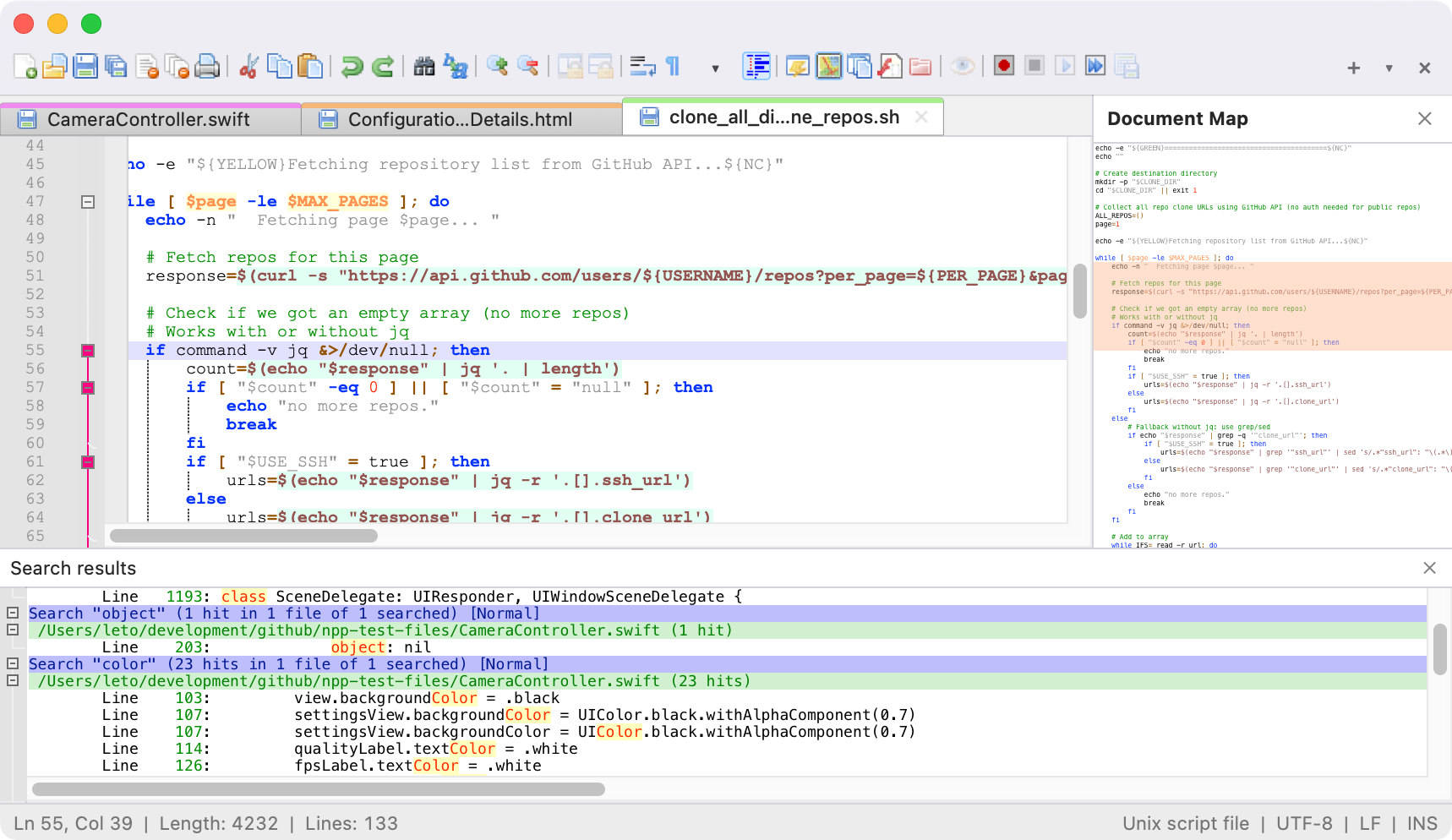
Notepad++ for Mac brings the Windows code editor to the Mac. It's a native macOS application, not a Windows binary running under Wine or CrossOver, and it's a full port of the upstream Notepad++ codebase.
Notepad++ has been one of the most popular text editors on Windows for more than 20 years, with hundreds of millions of downloads. Mac users never got their turn. This project finally gives them one, bringing Notepad++ and its growing catalogue of ported plugins to the Mac. For the official Windows version, visit notepad-plus-plus.org.
Why Build Notepad++ for Mac?
For two decades Notepad++ was Windows-only. Mac users who switched from Windows, or who worked across both platforms, had to choose between giving up the editor and running it through a Wine or CrossOver compatibility layer that always almost felt right but never quite did. Searches like "is there a Notepad++ for Mac" and "why no Notepad++ on Mac" have been answered with the same shrug for years.
Notepad++ is tightly coupled to the Win32 API. Windows, menus, dialogs, shortcuts, file pickers: all written against Win32. You can't just recompile Notepad++ for macOS. The Windows UI layer has to be replaced with a native Cocoa one, in Apple's language, while the C++ editing core (Scintilla included) stays in sync with upstream.
The goal isn't to reinvent Notepad++ or build something "Notepad++ inspired." It's to give Mac users the real thing: same menus, same shortcuts, muscle memory intact, plugins that still work. Apple Silicon native. Gatekeeper-signed. If you've used Notepad++ on Windows, it should feel like coming home.
Maintainer
Notepad++ for Mac is maintained by Andrey Letov, an independent developer who leads the port's native macOS layer and coordinates plugin-porting across the community. Andrey wrote the Objective-C++ Cocoa UI that replaces Notepad++'s Win32 front-end. He ported the plugin host to load native .dylib plugins, and he set up the signing and notarization pipeline that ships every release.
The project is run in the open on GitHub at github.com/notepad-plus-plus-mac. Issues, discussions, and pull requests are welcome from anyone who wants to help. Read more on the Author page, or find Andrey's other work at aletik.me. The project is independent of Don Ho and the upstream Notepad++ team; see below for the exact relationship.
How Notepad++ for Mac Was Built
Notepad++ for Mac is a native macOS application. It compiles against Apple's frameworks directly, from the original Notepad++ source tree, without Wine, Rosetta, or any compatibility layer in between.
The port is written in Objective-C++, which lets you mix C++ and Objective-C in the same file. The Mac version shares most of its editing logic with upstream and uses native Cocoa APIs for the UI layer: windows, menus, dialogs, toolbars, file pickers, shortcuts, clipboard, drag-and-drop, and the macOS document architecture.
The core editing component is Scintilla, the same mature engine used by upstream Notepad++, SciTE, and many other editors. Scintilla comes with 20+ years of work on syntax highlighting, folding, bracket matching, and layout, and upstream fixes flow into the Mac build with minimal friction.
The binary ships as a Universal Binary with native ARM64 (Apple Silicon) and x86_64 (Intel) slices, so Notepad++ runs at native speed on M1, M2, M3, M4, and M5 Macs without Rosetta, and on older Intel Macs down to macOS 11. The plugin system was reimplemented to load macOS dynamic libraries (.dylib); plugins are ported individually by the community. See the Plugins page for current status and the Online Help for user documentation.
Technology Stack
For developers curious about how Notepad++ for Mac is built, here is the full stack at a glance:
- Languages: Objective-C++ (C++17 combined with Objective-C) for the macOS layer; portable C++ for the shared editing core.
- UI framework: Apple Cocoa / AppKit. Native Mac windows, menus, dialogs, keyboard handling, clipboard, drag-and-drop.
- Editing engine: Scintilla (with Lexilla lexers for 80+ languages), shared unchanged with upstream Notepad++.
- Build system: CMake driving AppleClang on macOS, producing a single Universal Binary.
- Architectures: Universal Binary with native
arm64andx86_64slices. No Rosetta, no emulation. - Signing & distribution: Apple Developer ID code-signing, Apple notarization service, stapled notarization ticket, DMG distribution.
- Plugin system: macOS dynamic libraries (
.dylib), loaded through the reimplemented plugin host and surfaced in the Plugin Admin UI. - Minimum macOS: macOS 11 (Big Sur) and later.
Relationship to the Official Notepad++ Project
Notepad++ is an open-source project originally created and maintained by Don Ho since 2003. The official upstream repository lives at github.com/notepad-plus-plus/notepad-plus-plus and the official website is notepad-plus-plus.org. Notepad++ is released under the GNU General Public License v3, which explicitly permits community ports, forks, and derivative works.
This Mac port is an independent community effort, not affiliated with Don Ho or the upstream Notepad++ project. It honours the upstream licence by publishing the full source on GitHub and tracking upstream releases so Mac users get the same fixes, features, and language additions as Windows users.
The GitHub organisation notepad-plus-plus-mac contains the macOS fork, the ported plugins, and the plugin registry that powers the Plugin Admin inside the app. The repositories are open to pull requests for plugin ports, bug fixes, and feature work.
Security, Integrity & Trust
Every release is signed and notarized before it ships:
- Code-signed with an Apple Developer ID certificate. Every binary in the application bundle is cryptographically signed.
- Notarized by Apple. The DMG is submitted to Apple's notarization service, which scans for malware and known bad signatures before returning a signed ticket.
- Ticket stapled to the DMG, so Gatekeeper can verify notarization offline, without hitting Apple's servers.
- Built from public source. The exact commit used for each release is tagged in the GitHub repository, so anyone can audit or rebuild the software.
So when you download the DMG and open it for the first time, macOS Gatekeeper won't warn about an unidentified developer. You can verify the signature yourself from Terminal after installing:
codesign -dv --verbose=4 /Applications/Notepad++.app
spctl -a -vvv -t execute /Applications/Notepad++.app
The first command prints the signing identity and certificate chain inside the application bundle. The second asks Gatekeeper to re-evaluate the app and confirm it's notarized and accepted for execution. On a healthy install spctl should report source=Notarized Developer ID.
Notepad++ for Mac has no telemetry, no analytics, no ads. The only network access you should ever see from the app is when you open the Plugin Admin to browse or install plugins, which fetches the public plugin registry from GitHub. The full source is auditable at github.com/notepad-plus-plus-mac/notepad-plus-plus-macos.
Project Goals
- Native experience. Mac menus, Mac shortcuts, Mac file dialogs, Mac system integration.
- Feature parity. Bring as much of Notepad++ to the Mac as possible: syntax highlighting, plugins, macros, find-in-files.
- Apple Silicon native. Fast cold starts, low memory footprint.
- Open source. GPL v3, source on GitHub, same licence as upstream.
- Community-driven. Mac users contributing feedback, plugins, and improvements. See Resources for user guides and Plugins for porting status.
How Notepad++ for Mac Compares to Other Mac Editors
Mac users already have a lot of good text and code editors: Sublime Text, BBEdit, Visual Studio Code, TextMate, Nova, and the built-in TextEdit. They're all good editors with loyal users. Notepad++ for Mac isn't trying to replace any of them.
It's built for a specific audience: developers who already know Notepad++ from years of using it on Windows, and who want the same editor on their Mac. Same keyboard shortcuts, same Plugin Admin, same Session Manager, same find-in-files behaviour. If you've never used Notepad++ before, one of the editors above is probably a better fit. But if you're moving a Windows workflow to macOS, or you split your days between Windows and Mac machines, or you have years of Notepad++ muscle memory you'd rather not retrain, this project is for you. That's the niche.
Frequently Asked Questions
When was Notepad++ for Mac created?
The Notepad++ for Mac project was started on March 10, 2026 by Andrey Letov. The first public release (v1.0.0) shipped on April 7, 2026, and the project has shipped regular releases since then, tracking features and fixes from the upstream Notepad++ project. See the version history above for the full list of releases.
Who maintains Notepad++ for Mac?
Notepad++ for Mac is maintained by Andrey Letov and the open-source community contributing to the notepad-plus-plus-mac GitHub organisation. Andrey wrote the native macOS layer in Objective-C++ and organises plugin ports by community contributors. The project is independent of Don Ho and the upstream Notepad++ team. Read more on the Author page.
Is Notepad++ for Mac affiliated with Don Ho or the official Notepad++ team?
No. Notepad++ for Mac is an independent community project, not affiliated with Don Ho or the upstream Notepad++ project. It is built from the official open-source Notepad++ source code, which is released under the GNU General Public License v3, a licence that explicitly permits community ports and derivative works. For the official Windows version of Notepad++, visit notepad-plus-plus.org.
Is Notepad++ for Mac a fork or a port?
It is a port, not a fork. The core C++ editing logic and the Scintilla editing engine are shared with upstream Notepad++, so fixes and features added upstream flow into the Mac build. What changes is the Windows-specific UI layer, which is replaced with a native macOS Cocoa implementation written in Objective-C++. Nothing is forked away from upstream; the Mac port adds a new platform layer without diverging from the Windows codebase.
Why build a native Mac port instead of using Wine or CrossOver?
Wine-based wrappers run Notepad++ as a Windows application inside a compatibility layer, which means users see Windows-style dialogs and menus, lose native macOS keyboard shortcuts, pay a translation tax on every operation, and cannot use native macOS features like Gatekeeper, the system font picker, or Services. A native port feels like a Mac app because it is one: Apple Silicon native, Cocoa windows, standard macOS keyboard handling, Retina rendering, and full support for Apple Developer ID code signing and notarization.
How is Notepad++ for Mac different from Sublime Text, BBEdit, or VS Code?
Notepad++ for Mac serves a specific audience: developers who already know Notepad++ from Windows and want the same editor, same shortcuts, same plugins, and same muscle memory on macOS. Sublime Text, BBEdit, and VS Code are all excellent editors in their own right. Notepad++ for Mac is not trying to replace them; it provides a native Mac home for users who specifically want Notepad++.
Project Timeline
- March 10, 2026. Project started. First commits to the
notepad-plus-plus-macosrepository in thenotepad-plus-plus-macGitHub organisation. - April 7, 2026. v1.0.0 released: first public release with a Universal Binary, Developer ID signing, Apple notarization, and core Notepad++ features on native Cocoa.
- April 2026. v1.0.1 released: stability and polish. Bug fixes across file dialogs, keyboard shortcuts, dark-mode rendering, and plugin loading.
- April 14, 2026. v1.0.2 released: plugin API updates (
NPPM_GETCURRENTLANGTYPE,NPPM_GETLANGUAGENAME,NPPM_SETPLUGINSUBSCRIPTIONS) and hardening ofNPPM_SETMENUITEMCHECK. - Ongoing. Tracking upstream Notepad++ releases, porting additional community plugins, refining macOS integration. See the Download page for the current release and the GitHub releases for the complete changelog.
Version History
Show details
- New plugin APIs:
NPPM_GETCURRENTLANGTYPE,NPPM_GETLANGUAGENAME,NPPM_SETPLUGINSUBSCRIPTIONS - Hardened
NPPM_SETMENUITEMCHECK: rejects spuriouscmdID=0calls that corrupted submenu checkmarks - Plugin Admin improvements and additional ported plugins
Show details
- Bug fixes for file dialogs, keyboard shortcuts, and dark-mode rendering
- Tightened macOS Cocoa integration and tab management
- Plugin loader hardening for community
.dylibplugins
Show details
- First public release: native macOS application for Apple Silicon and Intel Macs
- Universal Binary (arm64 + x86_64), Developer ID signed, Apple notarized
- Core Notepad++ features: syntax highlighting for 80+ languages via Scintilla and Lexilla
- Plugin system loading native macOS
.dylibplugins - Native Cocoa UI: file dialogs, menus, keyboard shortcuts, dark mode, split view
Credits & Thanks
Notepad++ for Mac wouldn't exist without the work of the following people and projects:
- Don Ho, creator and maintainer of Notepad++ for Windows since 2003. The Mac port is built from his code, under the GPL v3 that he chose.
- Scintilla by Neil Hodgson: the source-code editing engine that powers both upstream Notepad++ and the Mac port.
- Lexilla: the syntax-highlighting lexers packaged alongside Scintilla that give Notepad++ its 80+ supported languages.
- Plugin authors whose work has been ported to the Mac: Mike Tzou, Rajendra Singh, Pavel Nedev, Justin Dailey, Ben Bluemel, Frank Fesevur, Query Kuma, Leonard Chai, Don Ho, jejemorg, Jakub Dvorak, Christian Grasser, Helder Sepulveda, and every contributor listed on the Plugins page.
- The GNU Project and the Free Software Foundation for the GPL v3, the licence under which both upstream Notepad++ and this Mac port are released.
- Apple for the Cocoa and AppKit frameworks, the AppleClang toolchain, and the Developer ID / notarization infrastructure that makes shipping a Mac app possible.
- Every user who reports a bug, files an issue, sends a pull request, or tells a friend about the project. Thank you.
Contact & Community
The project is developed in the open on GitHub. The best way to get in touch, report a bug, request a feature, or contribute code:
- Report a bug or request a feature: GitHub Issues. Every issue is read.
- Ask a question or start a conversation: GitHub Discussions. The right place for "how do I…?" questions, workflow tips, and plugin ideas.
- Contribute code or port a plugin: Fork the relevant repository under notepad-plus-plus-mac and open a pull request.
- Support the project: If Notepad++ for Mac saves you time, see the Donate page.
- Maintainer contact: Personal site at aletik.me, or the Author page on this site.